
 Omnisend AI


 OFFER
OFFER










A thank you for your order email is the automated message a customer receives right after placing an order. Customers open it for reassurance, not a pitch: they want to know the order went through, what they paid, and when the package arrives.
Some brands call it a thank you for your purchase email. Both names describe the same post-purchase email, sent once a customer completes checkout.
This guide gives you nine ready-to-use templates first, because most readers want copy they can use today. After that come five emails from ecommerce brands, a checklist of what to include, and a short section on spotting fake order emails.
Quick sign up | No credit card required
What is a thank you for your order email?
A thank you for your order email is a transactional message that thanks a customer for a purchase and confirms the details of that order. It goes out automatically, usually within minutes of checkout. Stores send it to reassure the customer, not to sell.
Businesses send this email with every completed order, so weak copy can reach thousands of customers. Give it the attention it deserves in your email marketing.
It differs from a basic order confirmation email by adding customer appreciation to the mix. A basic order confirmation lists the transaction details, such as order number, items, totals, and delivery date. A thank you for your order email carries the same facts, but it opens with gratitude and speaks in your brand’s voice.
The purchase is still fresh when customers receive this email, so they’re likely to notice how you speak to them. A simple thank you can make the interaction feel more personal.
The practical side matters just as much. Provide the order details in one place, and customers won’t need to contact support for basic answers.
Why should you send a thank you for your order email?
A thank you for your order email reassures customers after checkout and gives them a clear picture of what happens next. It also gives you an early chance to build a relationship that can bring customers back for another order.
Its main benefits include:
- Order reassurance: Customers will know their purchase went through without contacting support
- Less buyer’s regret: Seeing the order details and delivery date can give customers more confidence in their purchase
- Fewer support questions: Shipping, delivery, and order details give customers answers upfront
- More trust: A genuine thank you shows that you value the customer beyond the transaction
- A path forward: Adding order tracking or “save the receipt” options keeps the customer informed about next steps
Customers also tend to engage more with automated messages. Omnisend’s 2026 ecommerce marketing report found 24% higher open rates and six times higher click engagement than scheduled campaigns.
These numbers are for all automated messages, not just thank you for your order emails. So, treat these as broad benchmarks for what you can hope to achieve.
Post-purchase automated emails consistently generate higher engagement than standard promotional campaigns. A “thank you for your order” confirmation email is something the buyer expects. You’re meeting them at a point when their interest is highest. It can turn a routine transaction into something the buyer remembers and appreciates, fostering a meaningful connection.
— Agnė Ganchev, Director of Customer Success at Omnisend
Thank you for your order email templates
These thank you for your order email templates are free to copy, and each one covers a different post-purchase situation. Every template has a short note on when to use it, a subject line, the email body, and a line on why it works.
You can use these templates in Omnisend as automated workflows triggered by a placed order. The workflow pulls in product names and prices from your store, so you only need to customize the copy and set the trigger.
Jump to the template you need:
- Simple thank you for your order email template
- Thank you for your order confirmation email template
- Thank you for your purchase email template
- First purchase thank you email template
- Repeat customer thank you email template
- VIP or high-value order thank you email template
- Thank you email with discount template
- Thank you email with review request template
- Thank you for your order SMS template
Simple thank you for your order email template
When to use it: This works as your everyday thank you email when you want something warmer than a receipt. Use it when customers already get a separate order confirmation with all the details.
Subject line: Thank you for shopping with us, [Customer name]
Why it works: The message gets to the thank you first, then gives customers the key details. It’s short enough to read on a phone, and the reply option makes it easy to get help. For more copy ideas, see these thank you for your business messages.
Thank you for your order confirmation email template
When to use it: Choose this when you need one email to handle both the thank you and the order confirmation. It includes the full order breakdown and expected shipping window.
Subject line: Your [Brand name] order is confirmed! #[Order number]
Why it works: It gives customers a clear answer on where their order stands and when they can expect it. The timeline fills in the gap between placing the order and getting the package, and the reply option handles changes.
Thank you for your purchase email template
When to use it: Use it as a post-purchase thank you email that follows the transactional confirmation. It focuses on the customer and the product rather than the paperwork. Send it 30 minutes to an hour after the confirmation so the two don’t land together.
Subject line: Thanks, [Customer name]. Here’s what’s next
Why it works: It’s written around the product the customer chose, not the transaction. The single tip adds value before you ask for anything, which is the point of a post-purchase message. Stores that sell products with a setup step get the most from this one.
First purchase thank you email template
When to use it: Use it when someone places their first order with you. It can kick off your buyer welcome flow with a personal note and a short brand story.
Subject line: Welcome to the [Brand name] family!
Why it works: New customers don’t know your brand yet, so this email can give them a quick introduction. The brand mission tells them what you believe in, and the invitation gives them a next step. Keep the mission brief so the order details remain the focus, and use your welcome email flow to go into more detail.
Repeat customer thank you email template
When to use it: Use it when a customer comes back for their second or third order. They already know what you offer, so a small loyalty reward can give them another reason to come back.
Subject line: You’re back, and we love it
Why it works: This makes the customer feel noticed instead of sending another generic thank you for your order email. The reward has a clear reason behind it, which can help bring repeat customers back. Trigger the automation based on order count, not a date.
VIP or high-value order thank you email template
When to use it: For your highest-spending customers or orders that cross your high-value threshold. Focus on making them feel valued instead of offering another discount.
Subject line: Your order is our priority, [Customer name]
Why it works: There’s no discount because recognition is the point. A named sender and priority handling tell high-value customers that their order gets extra attention. The direct reply line gives them a clear way to reach someone.
Thank you email with discount template
When to use it: Send this once the customer has had time to try the product, rather than right after delivery. A limited-time offer can encourage a second order, especially when it comes after a genuine thank you.
Subject line: Thanks for your purchase! Here’s 15% off
Why it works: It starts with appreciation instead of jumping straight into a discount. The customer gets a discount code and 48 hours to use it, which gives them a reason to act quickly. Waiting until after delivery also keeps this discount email separate from the checkout experience. It also makes sense to use unique codes when a post-purchase email includes an offer.
Thank you email with review request template
When to use it: Once the order has been delivered and the customer has had a few days with the product. Asking earlier means asking about something they haven’t opened yet.
Subject line: [Customer name], tell us about your [Product name]
Why it works: The email starts with a thank you instead of immediately asking for a review. Saying it takes one minute makes the request more manageable. It also gives unhappy customers somewhere private to raise an issue before leaving a public review.
Thank you for your order SMS template
When to use it: Send it a few minutes after purchase, alongside the order confirmation email. Send it only to customers who opted in to texts. Keep it short, as you’ll cover the order details in the email
Subject line: Not required for SMS
Why it works: The text reaches customers while the purchase is still fresh in their minds. One link and no upsell keep the message short enough for a 160-character SMS. You can run both the SMS and email in one automated workflow, with the text following the email by a few minutes.
Choose a template, then tweak it before you put it to work. Match the greeting and sign-off to your brand, use one CTA, and check the email on a phone before activating the workflow.
5 real “thank you for your order” email examples
These five thank you for your order email examples come from ecommerce brands, and each shows one template type in use. All five are post-purchase emails, not newsletters.
For each example, you’ll see the email, what it does well, and one takeaway you can apply to your own message.
Example 1: Postable – A simple thank you for your order email
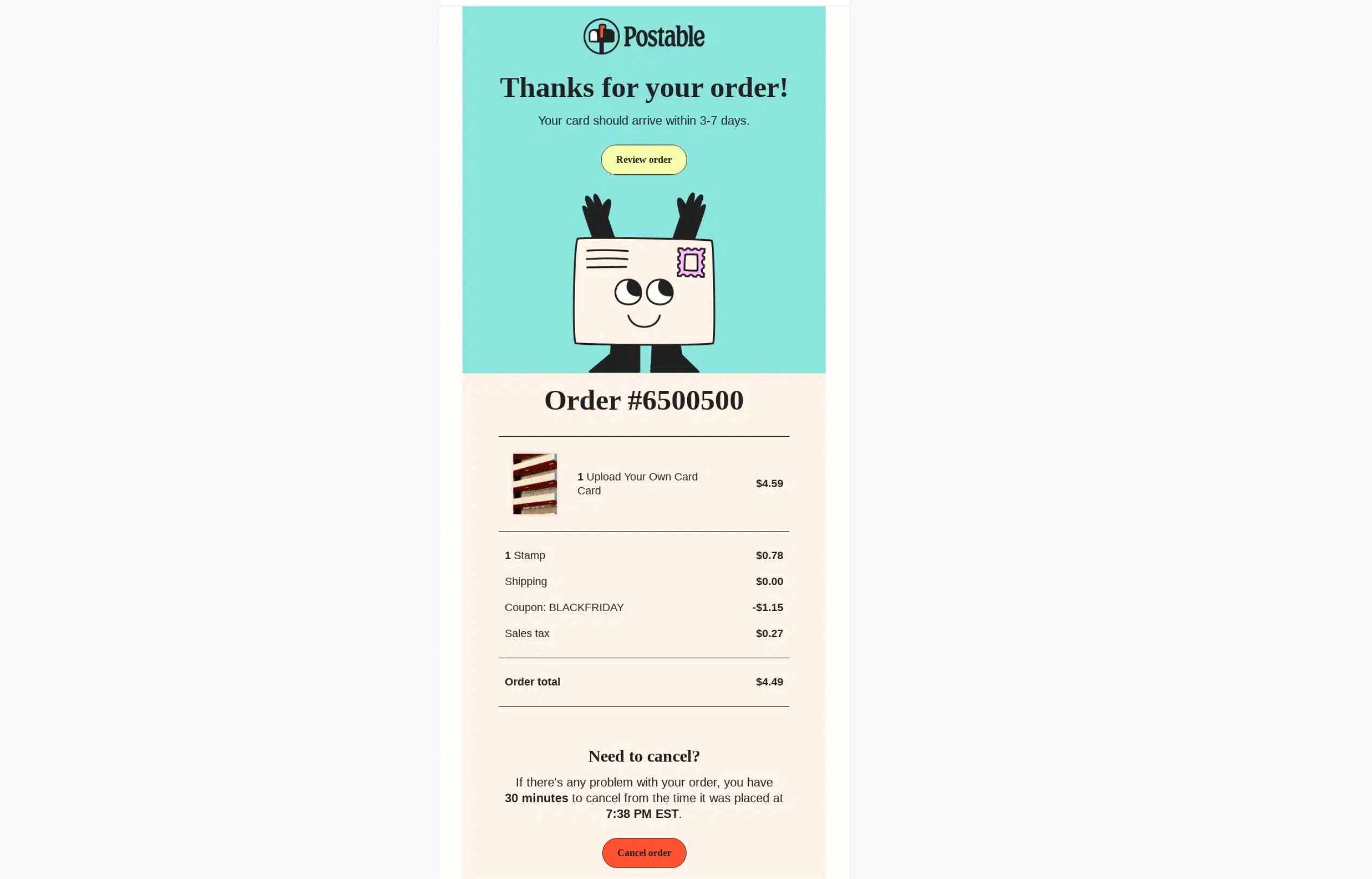
What the email does well: The email doesn’t make customers hunt for the information they need. It opens with a thank you, gives a three- to seven-day delivery estimate, and lists the complete order details. A separate button also gives customers 30 minutes to cancel.
Key takeaway: Mention the delivery window near the top of the email. Give customers an equally visible way to cancel if they need to. Making small fixes easy can prevent unnecessary support emails.
Example 2: Casper – Thank you for your order confirmation email
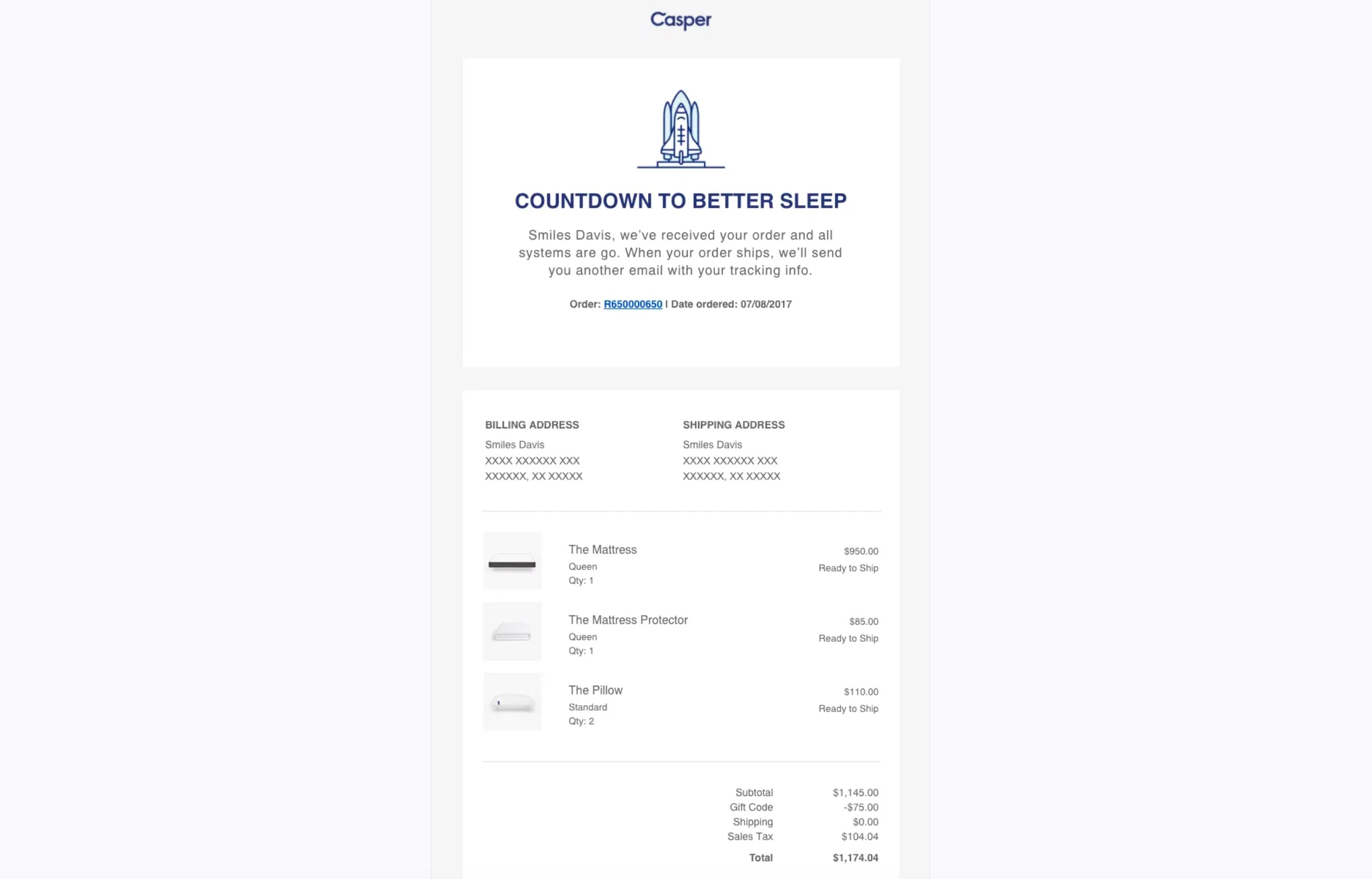
What the email does well: “Countdown to better sleep” says a lot in four words and gives the email some personality. The order details are easy to check, with addresses, product details, quantities, and prices.
Key takeaway: You don’t have to choose between personality and useful information. Keep each order detail easy to scan, and don’t add too much content around it. Use the headline to show some personality.
Example 3: Homes Alive – Thank you for your purchase email
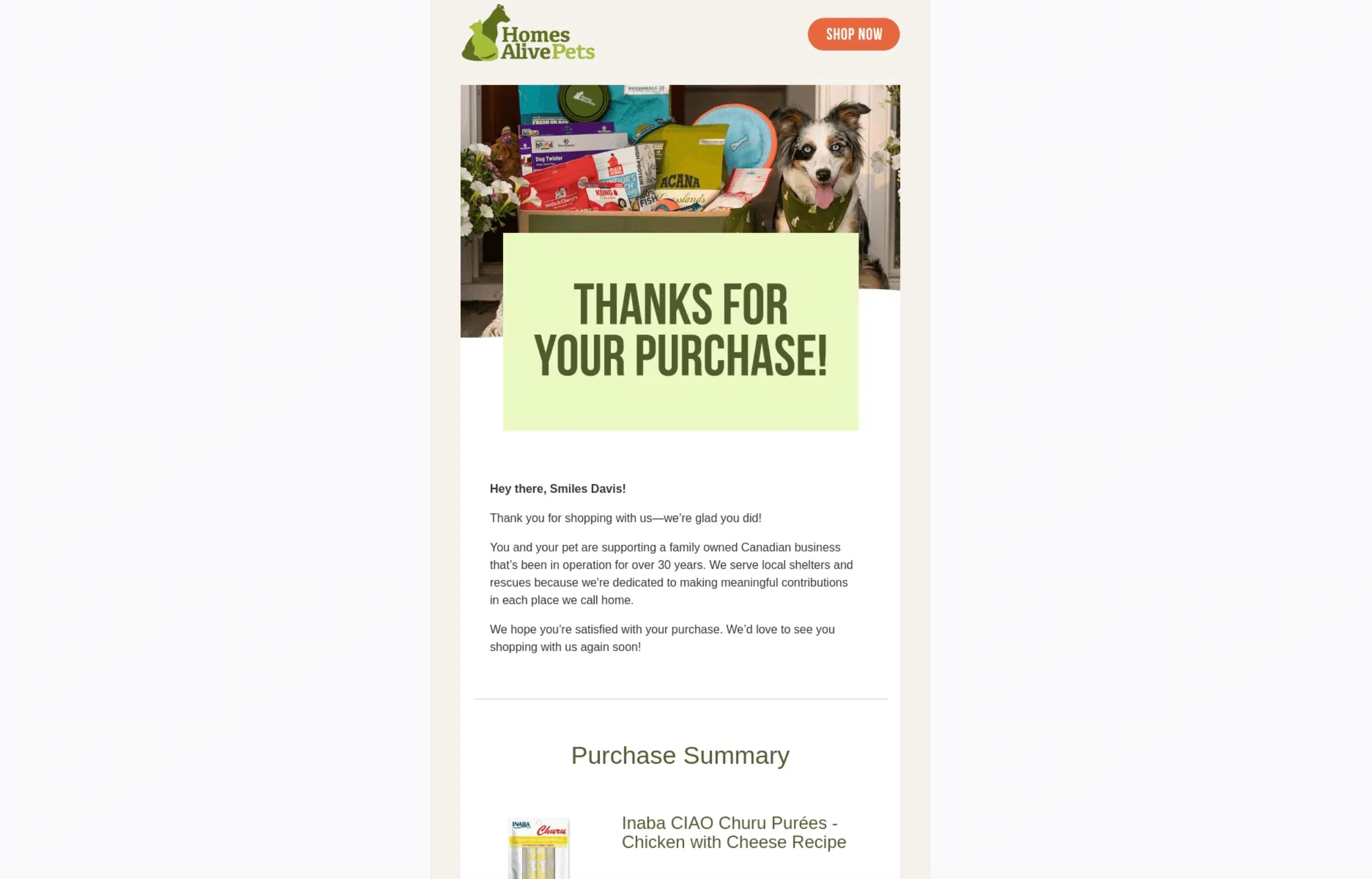
What the email does well: The email combines a simple thank you with a reason to feel good about the purchase. It explains the business’s connection to local shelters, then gives the customer the order summary.
Key takeaway: Let customers know what their purchase supports. A single sentence about your purpose can make the email feel more personal.
Example 4: Rains – Repeat customer thank-you email
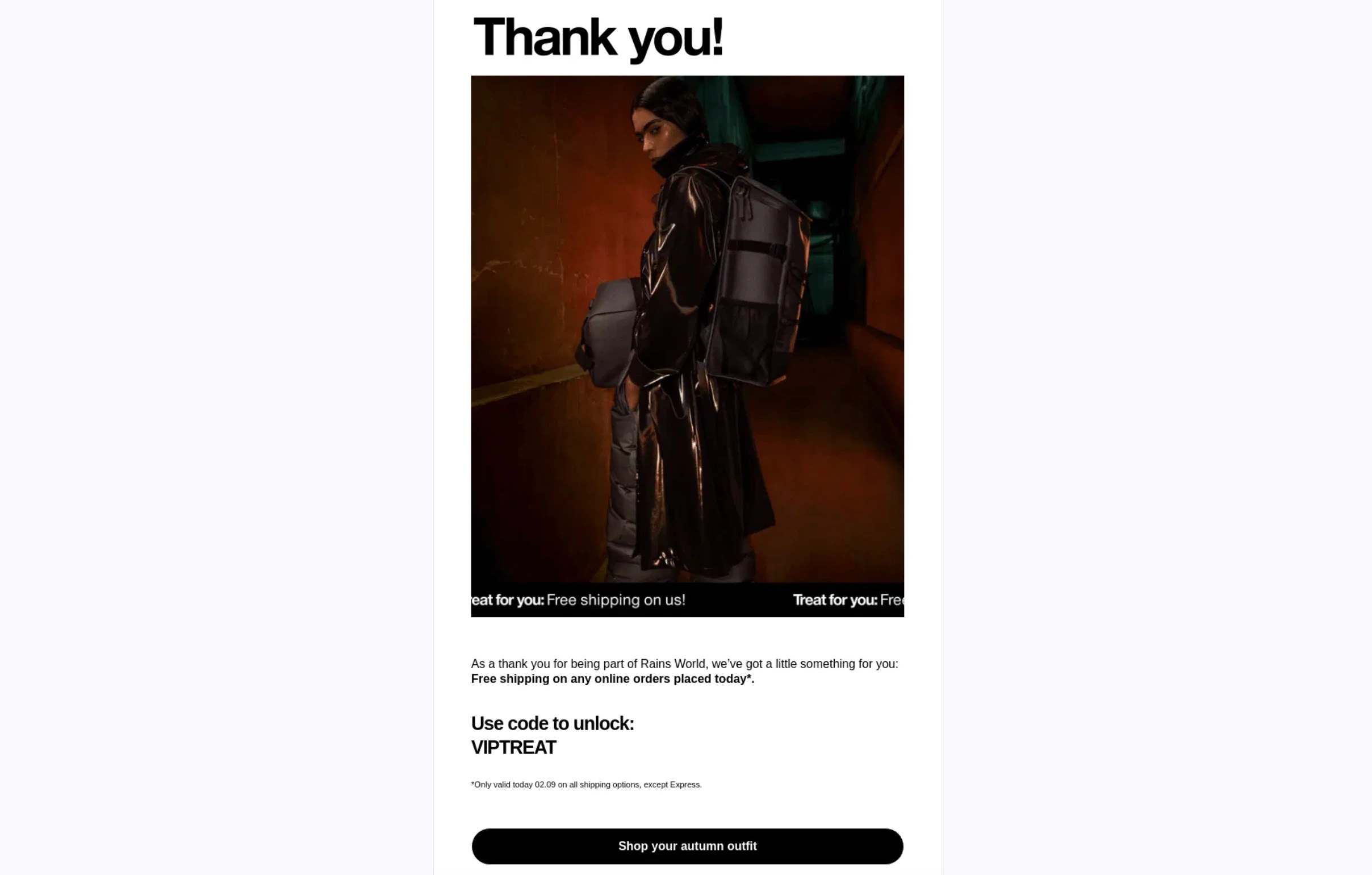
What the email does well: The email connects the reward to the customer relationship, rather than leading with a regular sale. The “VIPTREAT” code gives returning customers free shipping as a small thank you for sticking with the brand.
Key takeaway: Make your loyal customers feel valued. Even a small perk works when you frame it as thanks for their loyalty.
Example 5: Sleep Country – Thank-you email with discount
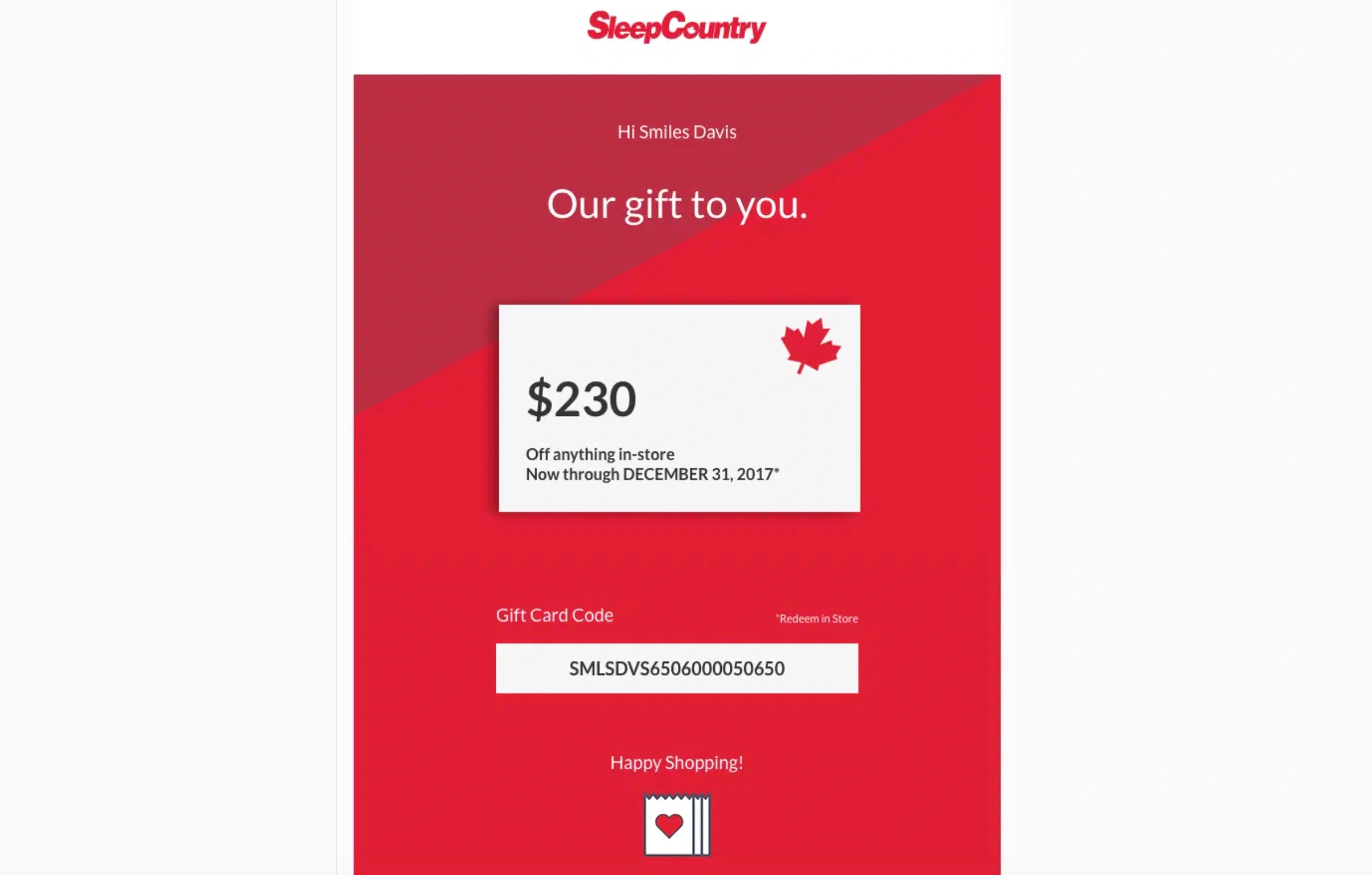
What the email does well: Customers can quickly see what they’re getting, find the code, and check when the offer expires. Nothing else gets in the way of those details.
Key takeaway: If you add an incentive, make the code and deadline the most visible part of the email. Everything else can take a backseat.
What to include in a thank you for your order email
A thank you for your order email has eight key elements, from subject line to a branded sign-off. Each answers a question the customer would otherwise send to support, from what they bought to how to reach you. Get these right, and even a simple design would work.
Here’s what you should include in your email:
- Clear subject line: Name the order or the thank you, and keep it under 50 characters so it isn’t cut off on mobile
- Personalized greeting: Use the customer’s first name, never “Dear customer”
- Short thank you message: Thank customers in two to three sentences, using your brand voice
- Order summary: List the products, quantities, variants, and the total paid
- Shipping and delivery details: Add the expected delivery date and tell customers when they’ll get the tracking details
- One relevant call to action: Track your order, leave a review, or join the rewards program
- Support or contact information: Explain exactly how to reach a person, by reply or by link
- Brand-appropriate sign-off: Name a person or the team, matching the tone of your store
Missing any one of these could lead to a support ticket or a lost click. If the subject line is where you get stuck, the free AI subject line generator and these email subject lines that get opened will help.
Best practices for writing a thank you for your purchase email
The best thank you for your purchase email arrives within minutes, thanks before it sells, and asks for one thing.
These are some of the best practices you should follow when writing such emails:
- Send it at the right time: Send it within minutes of checkout, rather than waiting for hours. If you’re sending a separate email for order confirmation, keep at least a 30-minute gap between the two.
- Lead with gratitude: Give the thank you and order details some space before you mention a promotion. If you want to include an offer, put it toward the end or use a separate email for it.
- Personalize based on the purchase: Mention the product, category, or the number of previous orders. Only using the first name can make it look like an automated email. Since your store already has this information, adding it doesn’t take much work.
- Give customers one thing to do: Choose the action that makes the most sense for that order and build the email around it. Add a single CTA button, as more than that can cause confusion and make the choice harder.
- Maintain a consistent brand voice: Your thank you email shouldn’t sound different from your checkout or product page. Maintain the same tone and voice in all communications and brand content. Clear brand voice guidelines can help make this easier.
- Run A/B tests: There are several things you can test, from the subject line to the incentive. Just change one thing at a time to get accurate results. Otherwise, the numbers won’t tell you much.
- Use SMS only when it adds value: Use automated text messages when an order needs urgent attention or the purchase is high-value. Keep the full receipt in email, as customers don’t need the same details twice.
How to spot a fake “thank you for your order” email
Thank you for your order email scams are fake confirmations sent to people who never ordered anything. The goal is to make them panic and call or click. In December 2025, MailGuard documented a version that used a PDF invoice and a fake support line to con victims.
The email looks like a real order confirmation and usually mentions something expensive or a subscription renewal. It then tells you to cancel the order by calling a number or opening an attachment. If you call, the scammer may lead you into a fake refund process.
Here’s how a legitimate confirmation differs from a fake one:
| Sign | A legitimate email | A fake email |
|---|---|---|
| Sender address | Matches the brand’s domain | A free webmail address or a lookalike domain |
| The order | One you placed, with your name and items | A purchase you never made, addressed generically |
| Attachments | None, or a receipt you expected | An unexpected PDF invoice |
| Support contact | The brand’s known channels | A phone number you’re urged to call now |
| Money | Nothing to pay or refund | Payment or refund pressure with a deadline |
| Links | Go to the brand’s site | Ask you to log in on an unfamiliar page |
Two or more signs from the right-hand column mean you should treat the message as fake until proven otherwise. If an order email looks wrong, verify it without touching anything inside the message:
- Check the sender domain against the brand’s own website address
- Go directly to the brand’s website by typing the address, instead of clicking links in the email
- Review the order history in your account to see whether the purchase exists
- Avoid opening unexpected attachments, and delete or report the message once no order shows up
The same rules apply when you’re sending these emails to customers. Stick with your usual sender domain, avoid attachments, and link only to your store. Your order confirmation emails should also look consistent to further build trust.
Conclusion
Think of your thank you for your order email as the first conversation after the sale. It should confirm the purchase, thank the customer, explain what happens next, and offer a next step.
Choose the template that matches the situation and include all eight key elements. Send it within minutes of checkout. That’s when the customer is still thinking about the purchase and expecting to hear from you.
Provide useful information, make the customer feel appreciated, and stick to the essentials, and you’re good to go.
Quick sign up | No credit card required
FAQs
How can I show gratitude after a purchase?
— Add a handwritten note to the product package
— Offer a discount on the next order
— Provide exclusive access to limited edition products
— Invite customers to a loyalty program
How long should a thank-you email be?
What is the difference between a thank you for your order confirmation email and a thank you email?
How do you automate a thank you for your order email?
1. Create a workflow using the Placed Order trigger with an Order status is paid filter
2. Connect it to your Shopify, WooCommerce, or BigCommerce store
3. Add your template
4. Set a 30-minute delay so it doesn’t arrive at the same time as the order confirmation email
